AS3600 Design Code
This example demonstrates how to work with the AS3600:2018 design code. We start by importing the necessary modules.
[1]:
import matplotlib.pyplot as plt
import numpy as np
from sectionproperties.pre.library import concrete_rectangular_section

from concreteproperties import (
    BilinearStressStrain,
    ConcreteSection,
    EurocodeParabolicUltimate,
    RectangularStressBlock,
)
from concreteproperties.design_codes import AS3600
from concreteproperties.post import si_kn_m, si_n_mm
from concreteproperties.results import BiaxialBendingResults, MomentInteractionResults
Create Design Code and Materials
In this example 40 MPa concrete will be used with the default 500N steel.
[2]:
design_code = AS3600()
concrete = design_code.create_concrete_material(compressive_strength=40)
steel = design_code.create_steel_material()
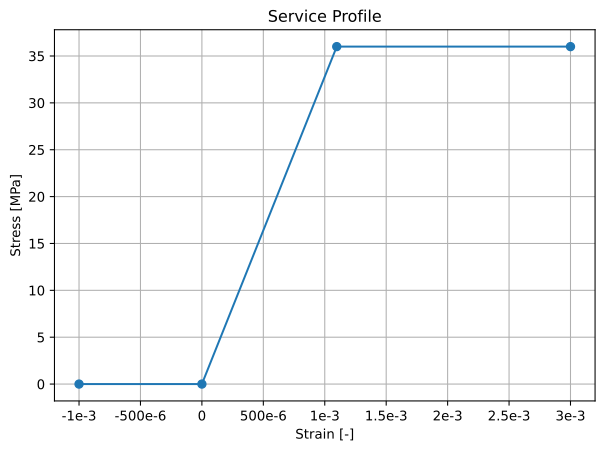
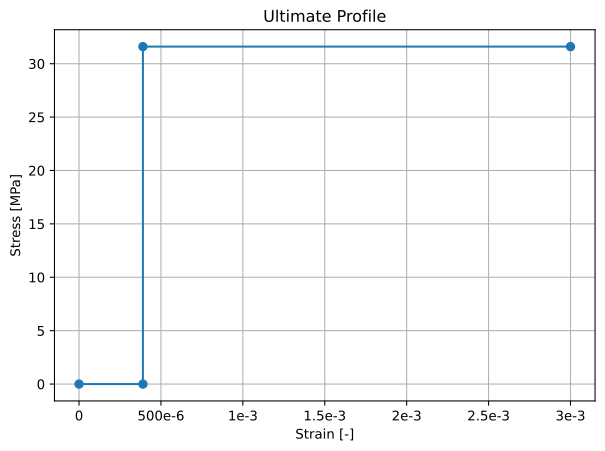
We can confirm the concrete material properties.
[3]:
print(concrete.name)
print(f"Density = {concrete.density} kg/mm^3")
concrete.stress_strain_profile.plot_stress_strain(
    title="Service Profile", eng=True, units=si_n_mm
)
concrete.ultimate_stress_strain_profile.plot_stress_strain(
    title="Ultimate Profile", eng=True, units=si_n_mm
)
print(
    f"Concrete Flexural Tensile Strength: {concrete.flexural_tensile_strength:.2f} MPa"
)
40 MPa Concrete (AS 3600:2018)
Density = 2.4e-06 kg/mm^3
Concrete Flexural Tensile Strength: 3.79 MPa
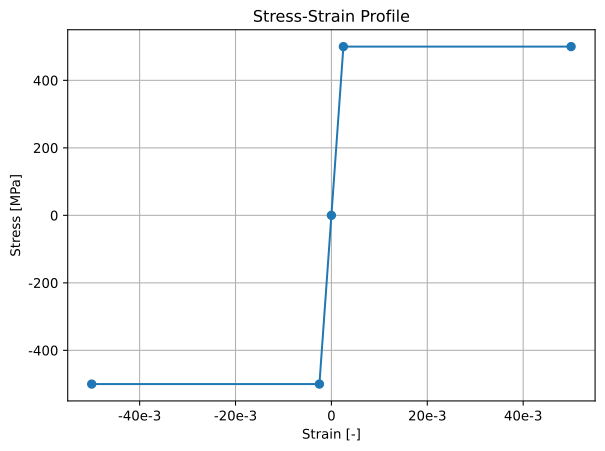
We can confirm the steel material properties.
[4]:
print(steel.name)
print(f"Density = {steel.density} kg/mm^3")
steel.stress_strain_profile.plot_stress_strain(eng=True, units=si_n_mm)
500 MPa Steel (AS 3600:2018)
Density = 7.85e-06 kg/mm^3
[4]:
<Axes: title={'center': 'Stress-Strain Profile'}, xlabel='Strain [-]', ylabel='Stress [MPa]'>
Assign Geometry to Design Code
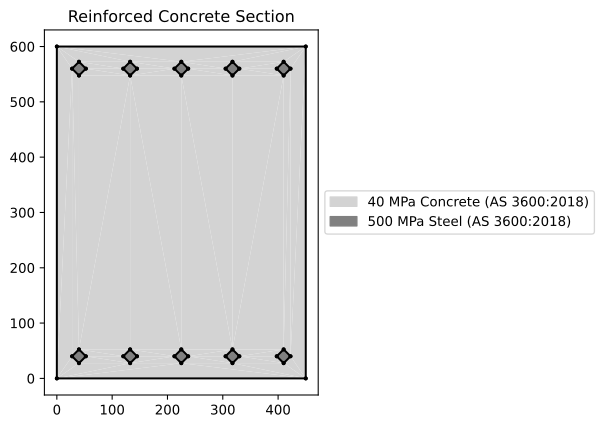
This example will analyse a 600D x 450W concrete beam with 5N20s top and bottom. After creating the geometry it must be assigned to the design code object.
[5]:
geom = concrete_rectangular_section(
    b=450,
    d=600,
    dia_top=20,
    area_top=310,
    n_top=5,
    c_top=30,
    dia_bot=20,
    area_bot=310,
    n_bot=5,
    c_bot=30,
    conc_mat=concrete,
    steel_mat=steel,
)

conc_sec = ConcreteSection(geom)
conc_sec.plot_section()
design_code.assign_concrete_section(concrete_section=conc_sec)
Area Properties
Obtaining the area properties is identical to that of a ConcreteSection object. The same can be done for a moment-curvature analysis and stress analyses (not carried out in this example).
[6]:
gross_props = design_code.get_gross_properties()
transformed_props = design_code.get_transformed_gross_properties(
    elastic_modulus=concrete.stress_strain_profile.elastic_modulus
)
cracked_props = design_code.calculate_cracked_properties()

gross_props.print_results()
cracked_props.print_results()
         Gross Concrete Section Properties
┏━━━━━━━━━━━━━━━━━━━━━━━━━━━┳━━━━━━━━━━━━━━━━━━━━━━┓
┃ Property                  ┃                Value ┃
┡━━━━━━━━━━━━━━━━━━━━━━━━━━━╇━━━━━━━━━━━━━━━━━━━━━━┩
│ Total Area                │    270.0 x 10^3 mm^2 │
│ Concrete Area             │    266.9 x 10^3 mm^2 │
│ Lumped Reinforcement Area │    3.100 x 10^3 mm^2 │
│ Axial Rigidity (EA)       │       9.374 x 10^9 N │
│ Mass (per unit length)    │  664.9 x 10^-3 kg/mm │
│ Perimeter                 │      2.100 x 10^3 mm │
├───────────────────────────┼──────────────────────┤
│ E.Qx                      │   2.812 x 10^12 N.mm │
│ E.Qy                      │   2.109 x 10^12 N.mm │
│ x-Centroid                │             225.0 mm │
│ y-Centroid                │             300.0 mm │
│ x-Centroid (Gross)        │             225.0 mm │
│ y-Centroid (Gross)        │             300.0 mm │
├───────────────────────────┼──────────────────────┤
│ E.Ixx_g                   │ 1.144 x 10^15 N.mm^2 │
│ E.Iyy_g                   │ 632.9 x 10^12 N.mm^2 │
│ E.Ixy_g                   │ 632.8 x 10^12 N.mm^2 │
│ E.Ixx_c                   │ 300.7 x 10^12 N.mm^2 │
│ E.Iyy_c                   │ 158.3 x 10^12 N.mm^2 │
│ E.Ixy_c                   │ 625.0 x 10^-3 N.mm^2 │
│ E.I11                     │ 300.7 x 10^12 N.mm^2 │
│ E.I22                     │ 158.3 x 10^12 N.mm^2 │
│ Principal Axis Angle      │           0.000 rads │
├───────────────────────────┼──────────────────────┤
│ E.Zxx+                    │   1.002 x 10^12 N.mm │
│ E.Zxx-                    │   1.002 x 10^12 N.mm │
│ E.Zyy+                    │    703.7 x 10^9 N.mm │
│ E.Zyy-                    │    703.7 x 10^9 N.mm │
│ E.Z11+                    │   1.002 x 10^12 N.mm │
│ E.Z11-                    │   1.002 x 10^12 N.mm │
│ E.Z22+                    │    703.7 x 10^9 N.mm │
│ E.Z22-                    │    703.7 x 10^9 N.mm │
├───────────────────────────┼──────────────────────┤
│ Ultimate Concrete Strain  │        3.000 x 10^-3 │
└───────────────────────────┴──────────────────────┘
 Cracked Concrete Section Properties
┏━━━━━━━━━━━━┳━━━━━━━━━━━━━━━━━━━━━━┓
┃ Property   ┃                Value ┃
┡━━━━━━━━━━━━╇━━━━━━━━━━━━━━━━━━━━━━┩
│ theta      │           0.000 rads │
├────────────┼──────────────────────┤
│ m_cr       │    116.0 x 10^6 N.mm │
│ d_nc       │             124.0 mm │
│ E.A_cr     │       2.399 x 10^9 N │
├────────────┼──────────────────────┤
│ E.Qx_cr    │   1.142 x 10^12 N.mm │
│ E.Qy_cr    │    539.7 x 10^9 N.mm │
│ x-Centroid │             225.0 mm │
│ y-Centroid │             476.0 mm │
├────────────┼──────────────────────┤
│ E.Ixx_g_cr │ 613.8 x 10^12 N.mm^2 │
│ E.Iyy_g_cr │ 162.1 x 10^12 N.mm^2 │
│ E.Ixy_g_cr │ 256.9 x 10^12 N.mm^2 │
│ E.Ixx_c_cr │ 70.15 x 10^12 N.mm^2 │
│ E.Iyy_c_cr │ 40.63 x 10^12 N.mm^2 │
│ E.Ixy_c_cr │ 62.50 x 10^-3 N.mm^2 │
│ E.Iuu_cr   │ 70.15 x 10^12 N.mm^2 │
│ E.I11_cr   │ 70.15 x 10^12 N.mm^2 │
│ E.I22_cr   │ 40.63 x 10^12 N.mm^2 │
├────────────┼──────────────────────┤
│ phi_cr     │           0.000 rads │
└────────────┴──────────────────────┘
Ultimate Bending Capacity
The factored ultimate bending capacity can be found by calling the ultimate_bending_capacity() method. This method returns a factored and unfactored UltimateBendingResults object, as well as the capacity reduction factor phi.
[7]:
f_ult_res, ult_res, phi = design_code.ultimate_bending_capacity()
print(f"Muo = {ult_res.m_xy / 1e6:.2f} kN.m")
print(f"kuo = {ult_res.k_u:.4f}")
print(f"phi = {phi:.3f}")
print(f"phi.Muo = {f_ult_res.m_xy / 1e6:.2f} kN.m")
Muo = 414.19 kN.m
kuo = 0.0898
phi = 0.850
phi.Muo = 352.07 kN.m
We can also pass an axial load to ultimate_bending_capacity(). This will calculate the factored moment capacity by ensuring the supplied axial load equals the factored axial capacity, i.e. given a design axial force, what is the maximum moment my section can handle?
[8]:
n_star = 1000e3
f_ult_res, ult_res, phi = design_code.ultimate_bending_capacity(n_design=n_star)
print(f"N* = {n_star / 1e3:.0f} kN")
print(f"Nu = {ult_res.n / 1e3:.2f} kN")
print(f"Mu = {ult_res.m_xy / 1e6:.2f} kN.m")
print(f"phi = {phi:.3f}")
print(f"phi.Nu = {f_ult_res.n / 1e3:.0f} kN")
print(f"phi.Mu = {f_ult_res.m_xy / 1e6:.2f} kN.m")
N* = 1000 kN
Nu = 1312.32 kN
Mu = 724.37 kN.m
phi = 0.762
phi.Nu = 1000 kN
phi.Mu = 551.98 kN.m
Moment Interaction Diagram
The factored moment interaction diagram can be found by calling the moment_interaction_diagram() method. This method returns a factored and unfactored MomentInteractionResults object.
[9]:
f_mi_res, mi_res, phis = design_code.moment_interaction_diagram(progress_bar=False)
We can compare the factored and unfactored moment interaction diagrams.
[10]:
MomentInteractionResults.plot_multiple_diagrams(
    [mi_res, f_mi_res],
    ["Unfactored", "Factored"],
    fmt="-",
    units=si_kn_m,
)
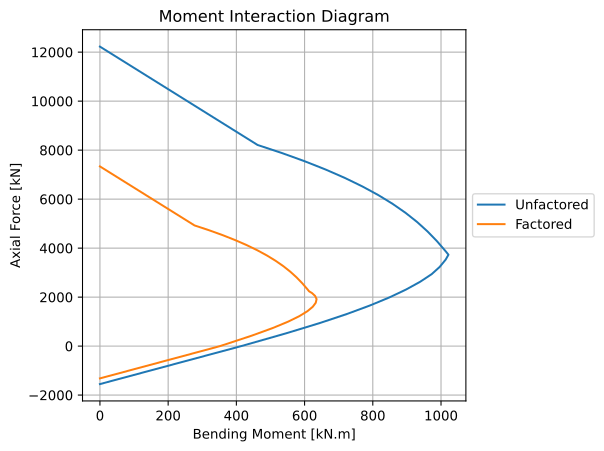
[10]:
<Axes: title={'center': 'Moment Interaction Diagram'}, xlabel='Bending Moment [kN.m]', ylabel='Axial Force [kN]'>
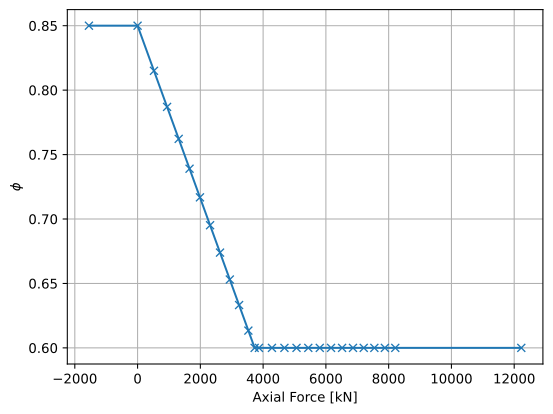
Using the list of capacity reduction factors phis, we can visualise how the capacity reduction factor varies as a function of the applied axial load.
[11]:
fig, ax = plt.subplots()
n_list, _ = mi_res.get_results_lists(moment="m_x")  # get list of axial loads
ax.plot(np.array(n_list) / 1e3, phis, "-x")
plt.xlabel("Axial Force [kN]")
plt.ylabel(r"$\phi$")
plt.grid()
plt.show()
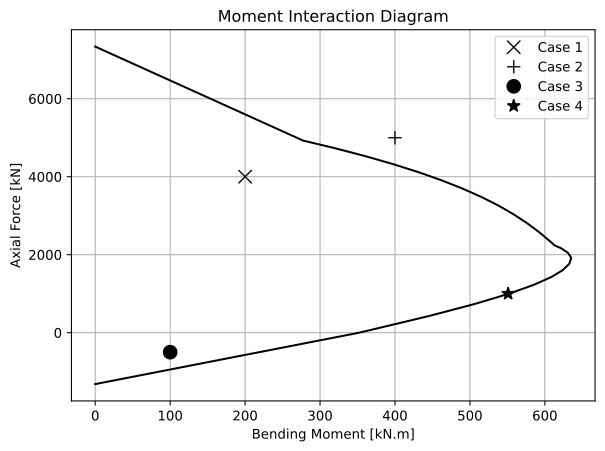
We can check to see if a combination of axial force and bending moment lies within the moment interaction diagram using the point_in_diagram() method.
[12]:
# design load cases
n_stars = [4000e3, 5000e3, -500e3, 1000e3]
m_stars = [200e6, 400e6, 100e6, 551e6]
marker_styles = ["x", "+", "o", "*"]
n_cases = len(n_stars)

# plot moment interaction diagram
ax = f_mi_res.plot_diagram(
    fmt="k-",
    units=si_kn_m,
    render=False,
)

# check to see if combination is within diagram and plot result
for idx in range(n_cases):
    case = f_mi_res.point_in_diagram(n=n_stars[idx], m=m_stars[idx])
    print("Case {num}: {status}".format(num=idx + 1, status="OK" if case else "FAIL"))
    ax.plot(
        m_stars[idx] / 1e6,
        n_stars[idx] / 1e3,
        "k" + marker_styles[idx],
        markersize=10,
        label=f"Case {idx + 1}",
    )

ax.legend()
plt.show()
Case 1: OK
Case 2: FAIL
Case 3: OK
Case 4: OK
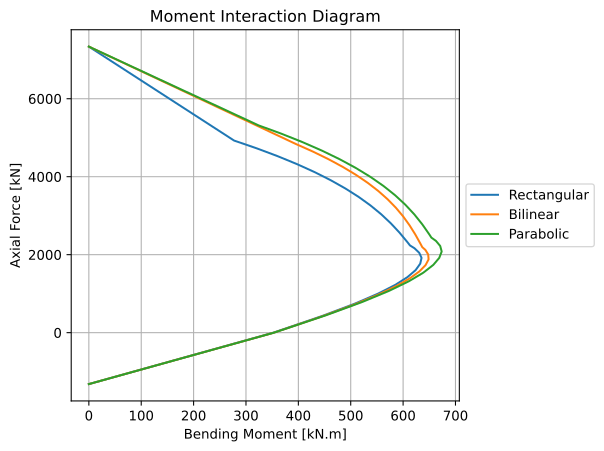
Let’s compare moment interaction diagrams using a rectangular stress block, a bilinear stress profile and a parabolic stress profile. AS 3600:2018 restricts the maximum stress in the profile to 0.9 * f'c.
[13]:
# bilinear
concrete.ultimate_stress_strain_profile = BilinearStressStrain(
    compressive_strength=0.9 * 40,
    compressive_strain=0.0015,
    ultimate_strain=0.003,
)
f_mi_res_bil, _, _ = design_code.moment_interaction_diagram(progress_bar=False)

# parabolic
concrete.ultimate_stress_strain_profile = EurocodeParabolicUltimate(
    compressive_strength=0.9 * 40,
    compressive_strain=0.0015,
    ultimate_strain=0.003,
    n=2,
)
f_mi_res_par, _, _ = design_code.moment_interaction_diagram(progress_bar=False)
[14]:
MomentInteractionResults.plot_multiple_diagrams(
    [f_mi_res, f_mi_res_bil, f_mi_res_par],
    ["Rectangular", "Bilinear", "Parabolic"],
    fmt="-",
    units=si_kn_m,
)
[14]:
<Axes: title={'center': 'Moment Interaction Diagram'}, xlabel='Bending Moment [kN.m]', ylabel='Axial Force [kN]'>
Biaxial Bending Diagram
We can also compute factored biaxial bending diagrams by calling the biaxial_bending_diagram() method. This method returns a factored BiaxialBendingResults object as well as a list of the capacity reduction factors phis.
[15]:
# reset concrete ultimate profile
concrete.ultimate_stress_strain_profile = RectangularStressBlock(
    compressive_strength=40,
    alpha=0.79,
    gamma=0.87,
    ultimate_strain=0.003,
)

# create biaxial bending diagram
f_bb_res1, phis1 = design_code.biaxial_bending_diagram(n_points=24, progress_bar=False)
bb_res1 = conc_sec.biaxial_bending_diagram(n_points=24, progress_bar=False)
f_bb_res2, phis2 = design_code.biaxial_bending_diagram(
    n_design=2000e3, n_points=24, progress_bar=False
)
bb_res2 = conc_sec.biaxial_bending_diagram(n=2000e3, n_points=24, progress_bar=False)
[16]:
# plot case 1
BiaxialBendingResults.plot_multiple_diagrams_2d(
    [bb_res1, f_bb_res1],
    labels=["Unfactored", "Factored"],
    units=si_kn_m,
)
print(f"Average phi = {np.mean(phis1):.3f}")

# plot case 2
BiaxialBendingResults.plot_multiple_diagrams_2d(
    [bb_res2, f_bb_res2],
    labels=["Unfactored", "Factored"],
    units=si_kn_m,
)
print(f"Average phi = {np.mean(phis2):.3f}")
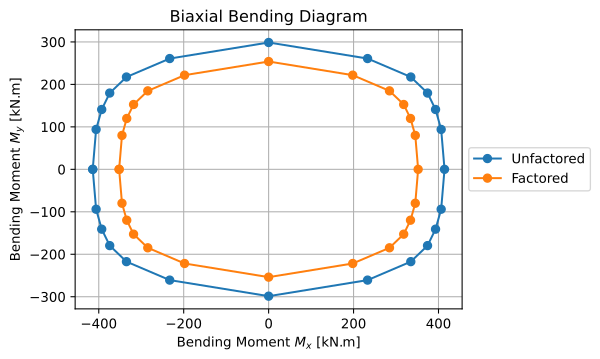
Average phi = 0.850
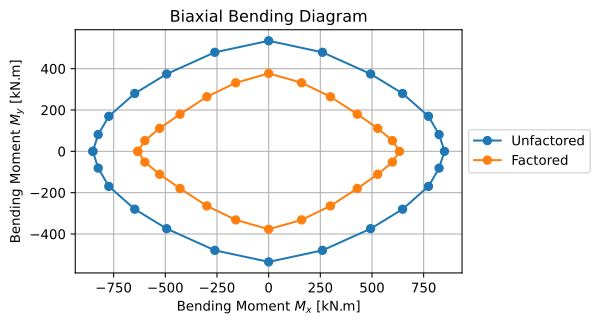
Average phi = 0.618
Note that as the bending angle changes, k_uo and N_ub change, resulting in a constantly changing value for phi.